Game Server Management Portal Web App
Why I built it
I built a small website that lets my friends run our Assetto Corsa racing server themselves: pick a track, choose the cars, hit Save, and the server restarts with the new setup.
The server runs on a Linux machine at my home, next to this blog. Before the portal, changing anything meant opening an SSH session, editing two config files in nano, and restarting the server by hand. Only I could do it, and every typo cost us a night of racing.
Now anyone on our friends list signs in with a code sent to their email and changes the setup from a browser, even from a phone.
What it does
The portal covers everything we used to do in a terminal, in plain forms with dropdowns and sliders.
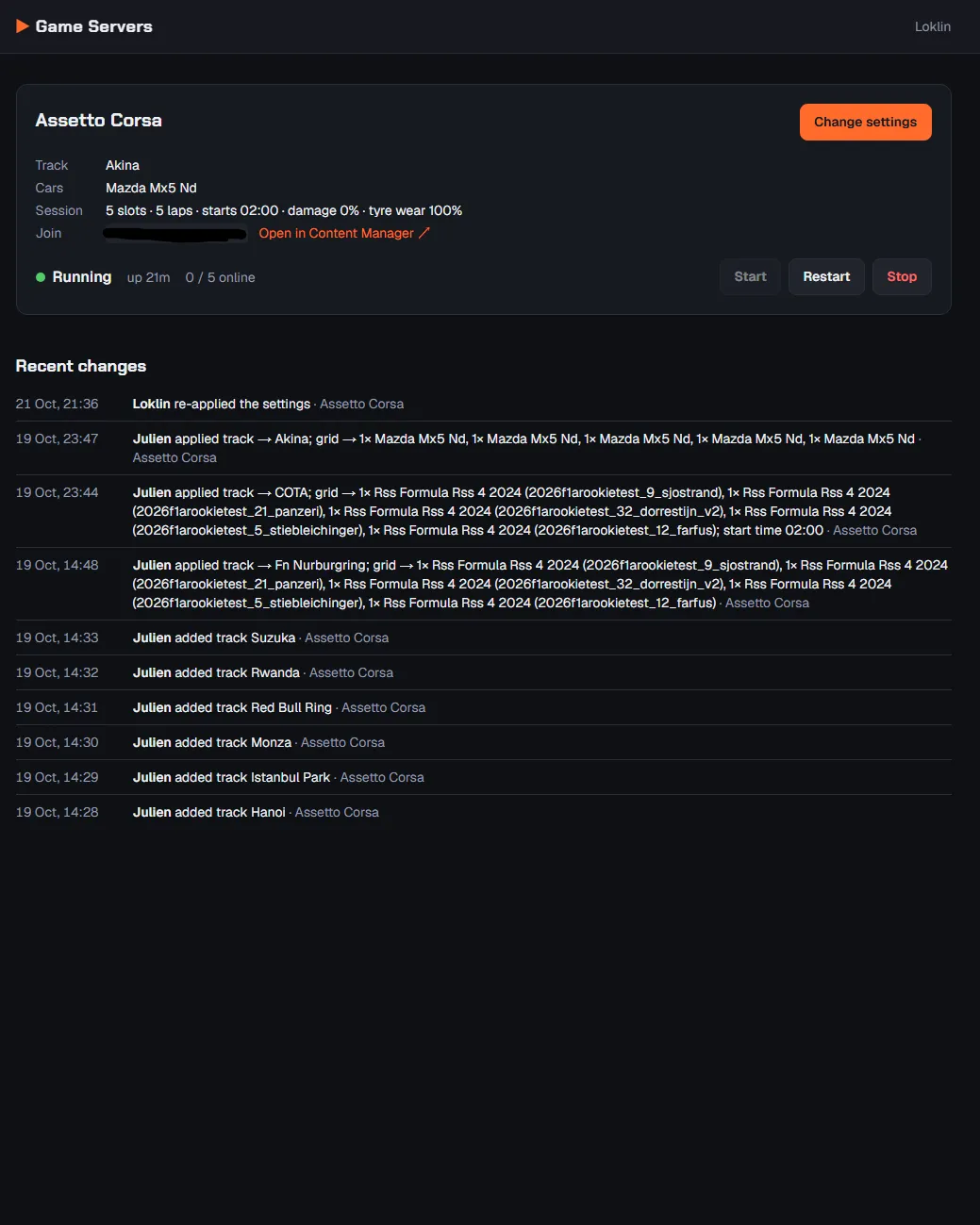
Dashboard: live status of the server, how long it has been up, who is online right now, and Start, Restart and Stop buttons. The join address comes with a one-click "Open in Content Manager" link.
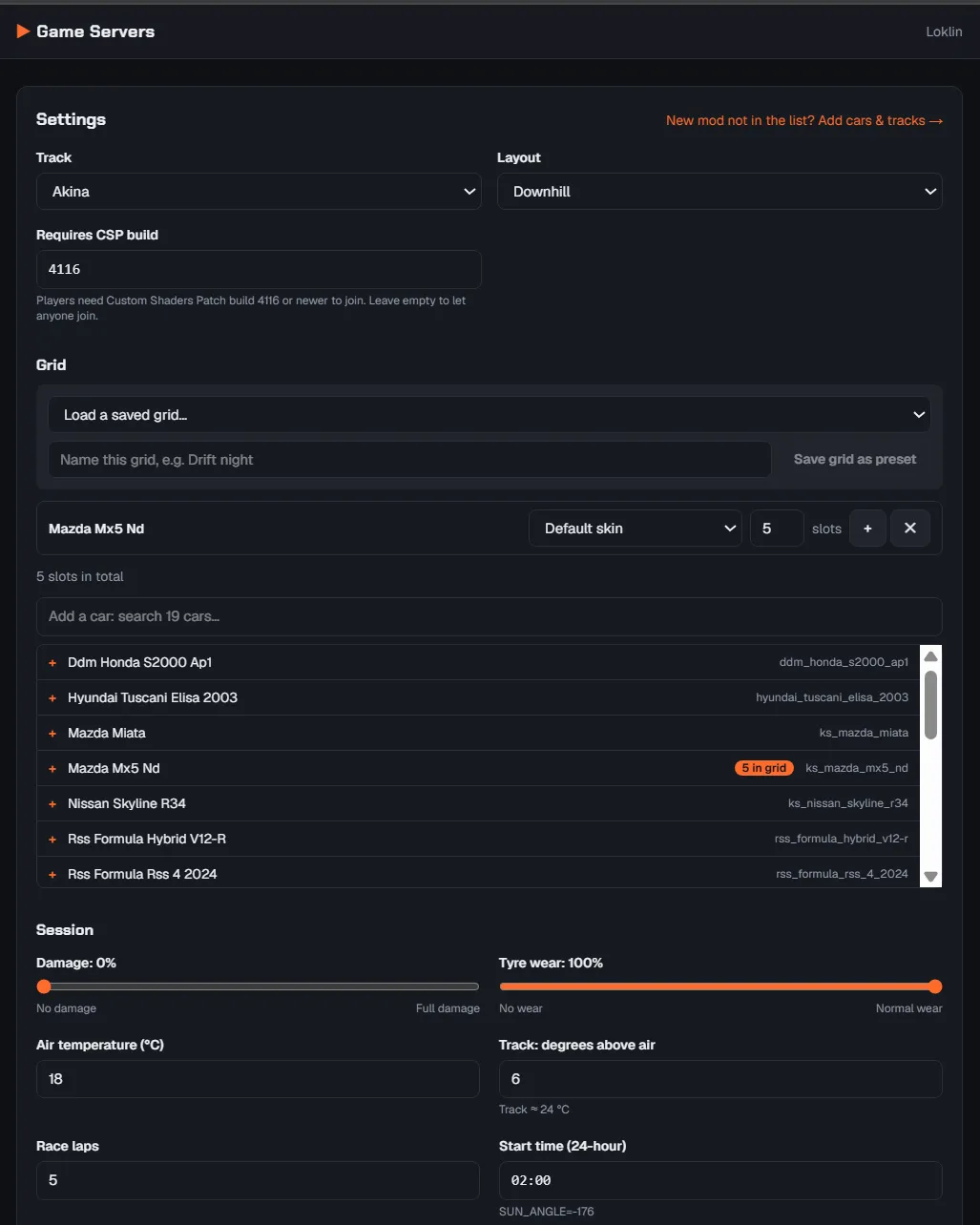
Track and layout: every installed track and mod track, with its layouts and pit-box limit. A field sets the minimum Custom Shaders Patch (CSP) build players need.
The grid: each row is a car, a skin and a number of slots. The total becomes the server's player limit and can't exceed the track's pit boxes.
Saved grids: name a grid ("Drift night") and load it again later in one click.
Session settings: damage and tyre wear sliders, race laps, air and track temperature, and the start time typed as normal 24-hour time.
Cars and tracks: new mods are added by folder name, with their skins and layouts, and can be edited or removed later. One click adds everything the server currently uses.
Recent changes: a log of who changed what and when.
Sign-in: friends type their email and get a one-time code. Nobody else can even reach the page.
Tech stack
I used the same web stack as this blog, so I only have one set of tools to keep up to date.
Next.js 16 (App Router) - Pages render on the server; Server Actions handle every change
React 19 + TypeScript - The interactive forms, fully typed end to end
Tailwind CSS 4 - Styling, with light and dark themes from one set of color tokens
Zod - Checks every form submission and saved file before it's used
systemd user services - Runs the website and the game server, restarts them after a crash, starts them on boot
Cloudflare Tunnel - Puts the portal on the internet without opening a port on my router
Cloudflare Access - Email one-time-code sign-in, limited to a list of friends
AssettoServer - The open-source Assetto Corsa server, which handles modded content well
Node's test runner + tsx - 27 unit tests, run against a sample server folder
GitHub - Code hosting; the server pulls updates from there
There's no database. The game's own config files are the source of truth, and the portal's few extras (the change log, hand-added cars and tracks, saved grids) live in small JSON files.
How it works
Two separate roads lead to the server: one for the website, one for the game.
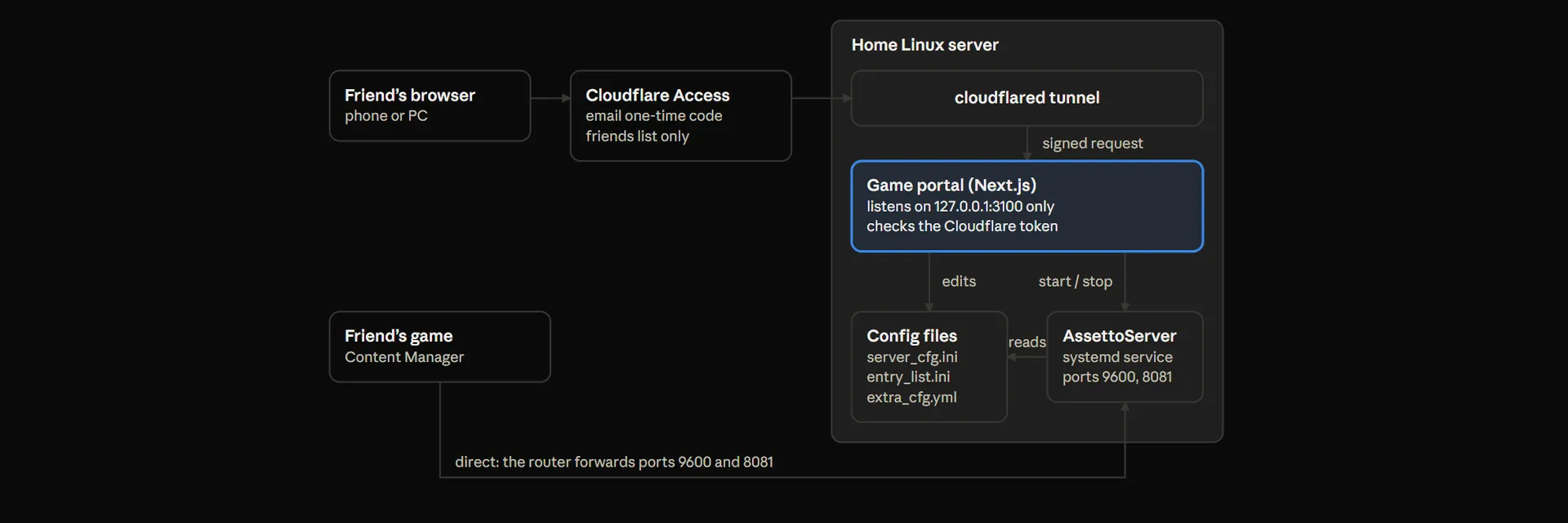
A friend's browser passes Cloudflare's sign-in and the tunnel to reach the portal. The portal edits the config files and starts or stops AssettoServer through systemd. The game itself connects straight to the server through two forwarded ports, so racing never depends on the website.
Interesting problems along the way
Editing config files without wrecking them. Assetto Corsa's files are Windows-style INI files full of settings the portal doesn't know about. I wrote a small INI editor that changes only the lines it needs and keeps comments, ordering and line endings exactly as they were. The previous version of each file is kept as a backup.
Not undoing hand-made changes. The entry list (who drives what car in which slot) can hold hand-tuned settings like AI traffic slots. The portal only rewrites it when the grid actually changes, so switching tracks never throws that work away.
Mods the server doesn't have. The server only needs a mod's folder name; every player has the files on their own PC. AssettoServer refuses to start without some of those files, so the portal sets the two options that relax that check, in the right section of its YAML config.
Time of day as an angle. The server's start time is stored as a sun angle. I confirmed the formula in AssettoServer's source code: 0 is 13:00 and every hour is 16 degrees. The portal converts it both ways, so friends just type 14:30.
Hidden format rules. Content Manager marks tracks that need a minimum Custom Shaders Patch build with a path like csp/4116/../D/../track. The portal reads that apart, keeps the requirement when the track changes, and lets friends edit the build number.
Security, because this site controls a computer. Cloudflare blocks anyone not on the list before they reach the site. The portal also checks Cloudflare's signed token on every request. Commands run without a shell, and only service names from a fixed config file are allowed.
Deploying it, and what the home server taught me
Updates follow one path: I push to GitHub, then a single script on the server pulls the code, builds it and restarts only the website. The race server keeps running throughout.
The real server had a few surprises a tidy test setup never shows:
Interrupted installs hurt. An apt command cut off by a dropped SSH connection left the system half-updated, and the next boot stopped at an emergency disk check. A one-line fsck fixed it. Now long jobs run on the machine itself or inside tmux.
Two versions of Node.js. A forgotten nvm install put Node 16 ahead of the system's Node 24 in my terminal. The deploy scripts now always pick the system one.
Copy-pasted config has rules. Our server's plugin settings were missing one --- line, and AssettoServer refused to start. The portal now puts that line back whenever it touches the file.
Test against the real thing early. Running the portal against a copy of our actual server config found three formats my sample data didn't have, before any friend saw a bug.
I also kept a handbook in the repository: start and stop commands, adding friends and mods, and a troubleshooting table.
What's next
Assetto Corsa was the first game; our Valheim and Minecraft servers are next. The portal was built for that from day one. Each game plugs in through one small adapter, while the dashboard, start/stop controls, logs and change history are shared. Adding a game means writing its adapter and its settings form, not a new website.